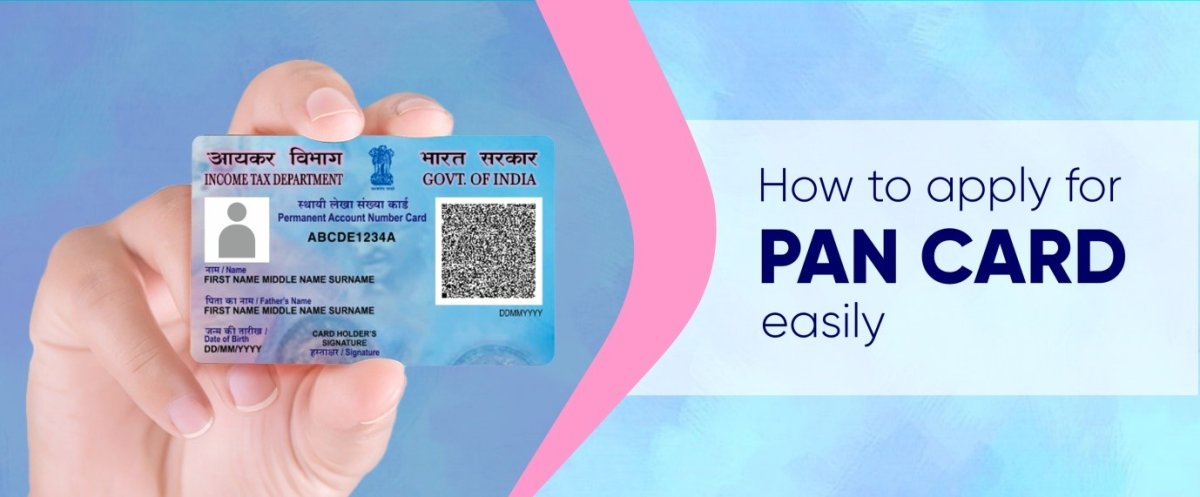
How to Apply for PAN Card Online in 2025 - Complete Step-by-Step Guide
What is PAN Card?
PAN (Permanent Account Number) is a unique 10-digit alphanumeric identifier issued by the Income Tax Department of India. It's mandatory for financial transactions, filing income tax returns, and various government services.
Format: ABCDE1234F (5 letters + 4 numbers + 1 letter)
Why Do You Need a PAN Card?
- ✅ Filing Income Tax Returns (ITR)
- ✅ Opening Bank Accounts
- ✅ Buying/Selling Property
- ✅ Vehicle Registration
- ✅ Starting a Business
- ✅ Applying for Credit Cards/Loans
- ✅ High-value Transactions (>₹50,000)
- ✅ Demat Account Opening
Eligibility Criteria for PAN Card
Any individual, company, or entity can apply for PAN card:
- 📌 Indian Citizens (residing in India or abroad)
- 📌 Foreign Citizens (working/doing business in India)
- 📌 Companies and Firms
- 📌 Trusts and Societies
- 📌 No minimum age limit
Documents Required for PAN Card
Identity Proof (Any One):
- 📄 Aadhaar Card (Most preferred)
- 📄 Passport
- 📄 Voter ID Card
- 📄 Driving License
- 📄 Ration Card
- 📄 Bank Account Statement
Address Proof (Any One):
- 📄 Aadhaar Card
- 📄 Passport
- 📄 Utility Bills (Electricity, Gas, Water - within 3 months)
- 📄 Bank Statement (within 3 months)
- 📄 Rent Agreement
- 📄 Property Documents
Date of Birth Proof (Any One):
- 📄 Birth Certificate
- 📄 School Leaving Certificate
- 📄 Passport
- 📄 Aadhaar Card
Additional Requirements:
- 📸 Recent Passport-size Photograph
- ✍️ Signature (on white paper)
Step-by-Step Guide: How to Apply for PAN Card Online
Method 1: Through DocsAI (Fastest & Easiest)
Step 1: Visit DocsAI.in and login to your account
Step 2: Navigate to Services → PAN Card Application
Step 3: Fill the online form with:
- Personal Details (Name, Father's Name, Mother's Name)
- Date of Birth
- Contact Information (Email, Mobile)
- Address Details
Step 4: Upload required documents:
- Identity Proof
- Address Proof
- Date of Birth Proof
- Photograph
- Signature
Step 5: Review your application carefully
Step 6: Make payment (₹107 including GST)
Step 7: Submit application
Step 8: Receive acknowledgment number via email & SMS
Step 9: Track your application status on dashboard
Step 10: Receive PAN card within 7-15 working days
Method 2: Through NSDL Website
Step 1: Visit NSDL PAN Portal
Step 2: Click on "Apply for New PAN Card (Form 49A)"
Step 3: Fill Form 49A with all details
Step 4: Upload scanned documents
Step 5: Make online payment
Step 6: Submit and note acknowledgment number
Method 3: Through UTI Website
Step 1: Visit UTI PAN Portal
Step 2: Select "Apply for PAN"
Step 3: Complete the online form
Step 4: Upload documents and make payment
PAN Card Application Fees
| Application Type | Indian Address | Foreign Address |
|---|---|---|
| New PAN Card | ₹107 (₹93 + 18% GST) | ₹1,020 (₹864 + 18% GST) |
| Changes/Corrections | ₹107 | ₹1,020 |
| Reprint of PAN Card | ₹50 | ₹959 |
Processing Time
- ⏱️ Physical PAN Card: 7-15 working days
- ⏱️ E-PAN (Digital): Within 24-48 hours
- ⏱️ Through DocsAI: Fastest processing with expert assistance
How to Track PAN Card Application Status
For NSDL Applications:
Visit: NSDL Status Tracking
Enter your acknowledgment number to check status
For UTI Applications:
Visit: UTI Status Tracking
Through DocsAI:
Login to your dashboard and check application status in real-time with detailed updates
Common Mistakes to Avoid
❌ Incorrect Name Spelling: Match exactly with documents
✅ Solution: Double-check before submission
❌ Wrong Date of Birth: Common rejection reason
✅ Solution: Verify with birth certificate
❌ Poor Quality Photos: Blurry or unclear images
✅ Solution: Use high-resolution scans
❌ Incomplete Address: Missing pin code or state
✅ Solution: Provide complete address with pin code
❌ Signature Mismatch: Different from documents
✅ Solution: Use consistent signature
Benefits of Applying Through DocsAI
- 🚀 Instant Application: Apply in just 5 minutes
- ✅ Expert Verification: Our team checks before submission
- 📱 Real-time Tracking: Monitor status 24/7
- 💬 WhatsApp Updates: Get instant notifications
- 🔒 Secure Platform: Your data is protected
- 💰 Transparent Pricing: No hidden charges
- 🎯 High Success Rate: 99% approval rate
- 🆘 24/7 Support: Help when you need it
FAQs About PAN Card Application
Q1: Can I apply for PAN card without Aadhaar?
A: Yes, you can apply using other identity documents like passport, voter ID, or driving license. However, Aadhaar-based application is faster.
Q2: How long does it take to get PAN card?
A: Physical PAN card takes 7-15 working days. E-PAN is issued within 24-48 hours.
Q3: Can I have two PAN cards?
A: No, having multiple PAN cards is illegal and punishable. If you have two, surrender one immediately.
Q4: Is PAN card mandatory for everyone?
A: It's mandatory if your annual income exceeds ₹2.5 lakhs or for specific financial transactions.
Q5: Can minors get PAN card?
A: Yes, there's no minimum age limit. Parents/guardians can apply on behalf of minors.
Q6: What if I made a mistake in my PAN application?
A: You can apply for PAN card correction/update using Form 49A with correction request.
Q7: How much does PAN card cost?
A: ₹107 for Indian address and ₹1,020 for foreign address (including GST).
Q8: Can I download E-PAN immediately?
A: Yes, E-PAN is available for download within 24-48 hours after successful application.
Q9: Is Aadhaar-PAN linking mandatory?
A: Yes, as per government rules, linking Aadhaar with PAN is mandatory. Deadline: June 30, 2023 (check latest deadline).
Q10: What happens if PAN application is rejected?
A: You'll receive a rejection notice with reasons. You can reapply after correcting the issues.
Conclusion
Applying for a PAN card online has never been easier! Whether you choose NSDL, UTI, or DocsAI, the process is simple and straightforward. For the fastest and most hassle-free experience, we recommend using DocsAI where our expert team handles everything for you.
Ready to apply? Click here to start your PAN card application now!
Need help? Contact our support team at support@docsai.in or call +91-7892214408.
Last Updated: October 2025 | Reading Time: 8 minutes
Be the first to comment on this post!